
POS Software Price in Bangladesh: Complete Cost Guide (2026)
If you are searching for POS software price in Bangladesh, you will quickly notice that there is no single fixed price. A basic POS system may cost around ৳15,000, while a more advanced or customized solution can cost significantly more depending on features, users, branches, inventory requirements, and integrations.
For businesses in Bangladesh, choosing the right POS system is not simply about finding the cheapest software. You need to consider what you are actually getting for the price, including billing, inventory management, reporting, customer management, accounting, VAT reporting, support, hosting, backup, and customization.
In this complete 2026 guide, we explain the POS software price in Bangladesh, the different pricing options, additional costs, important features, and how to choose the right POS solution for your business.
What Is POS Software?
POS stands for Point of Sale. POS software is a business management system that helps you manage sales, billing, inventory, customers, purchases, payments, and business reports from one platform.
Modern POS software is much more than a digital cash register. Depending on the system, it can help you:
- Create invoices and receipts
- Track daily sales
- Manage product inventory
- Monitor stock levels
- Track customer information
- Manage suppliers and purchases
- Monitor outstanding payments
- Generate profit and loss reports
- Manage multiple branches
- Generate VAT-related reports
- Track employee sales
- Analyze business performance
For businesses in Bangladesh, POS software can be useful for retail shops, supermarkets, pharmacies, restaurants, fashion stores, wholesalers, and other businesses.
POS Software Price in Bangladesh in 2026
The price of POS software depends mainly on the features and business requirements.
As a general market guide, POS software in Bangladesh can range from approximately ৳12,000 to ৳50,000+, while customized enterprise solutions can cost considerably more.
Some current market listings show basic POS solutions around ৳12,000–৳15,000, while complete software-and-hardware packages can reach ৳50,000–৳65,000 or more. Actual prices vary according to the vendor, hardware, features, and configuration.
A practical price breakdown looks like this:
| POS Type | Approximate Price |
| Basic POS Software | ৳12,000 – ৳20,000 |
| Professional POS Software | ৳20,000 – ৳40,000 |
| Advanced/Corporate POS | ৳30,000 – ৳50,000+ |
| POS Software + Hardware | ৳40,000 – ৳70,000+ |
| Customized POS/ERP Solution | Depends on requirements |
These figures are general market ranges, not fixed industry prices.
Sunshine POS Software Price in Bangladesh
If you are specifically comparing Sunshine POS software pricing, Sunshine currently lists three main packages.
According to its current pricing information:
Basic POS Software — ৳15,000
The Basic package includes:
- Single company
- Single warehouse
- 1–3 users
- Free online training
- Physical training for 1–3 users
- Free software domain
- Free software hosting
Backup and SMS integration are not included in this package.
Professional POS Software — ৳20,000
The Professional package is designed for businesses that need more flexibility.
It includes:
- Single company
- Limited multi-warehouse support
- Up to 5 users
- Free online training
- Physical training for one week
- Free software domain
- Free software hosting
- Monthly backup
- SMS integration
Sunshine lists the Professional package at ৳20,000.
Corporate POS Software — ৳30,000
For businesses with larger operational requirements, the Corporate package is listed at ৳30,000.
It includes:
- Single company
- Multi-warehouse support
- Unlimited user type
- Free online training
- One week of physical training
- Free software domain
- Free software hosting
- Monthly backup
- SMS integration
The company also states that its POS software can be customized according to business requirements.
What Determines POS Software Price in Bangladesh?
Two businesses can receive completely different POS software quotations because their requirements are different.
Here are the most important factors that affect the price.
1. Number of Users
A small shop may need only one or two users.
A supermarket or wholesale business may require several employees to access the system simultaneously.
Some vendors charge based on the number of users, while others offer packages with a fixed number of users.
Before purchasing, ask:
How many users are included in the price?
2. Number of Branches
If you operate only one store, a basic POS system may be enough.
However, if you have multiple branches, you may need:
- Branch-wise sales
- Centralized inventory
- Branch transfer
- Branch-wise reporting
- Centralized customer database
- User permissions
- Multi-location management
Multi-branch functionality can increase the overall POS software cost.
3. Inventory Management
Inventory management is one of the most important parts of a modern POS system.
A good system should allow you to:
- Add products
- Track stock
- Monitor low-stock items
- Manage product variations
- Record purchases
- Adjust inventory
- Track stock movement
- Manage barcodes
For businesses with thousands of products, advanced inventory features can significantly improve daily operations.
4. Accounting Features
Some POS systems focus mainly on sales and billing.
Others include accounting and financial management features such as:
- Income and expenses
- Profit and loss
- Cash flow
- Payment tracking
- Customer dues
- Supplier dues
- Financial reports
If you want both sales and financial information in one system, an integrated POS solution may be more valuable than a basic billing application.
Sunshine’s POS platform, for example, lists accounting and financial management features including income and expenses, profit and loss, cash flow and VAT reports.
POS Software Features You Should Look For
Before choosing a POS system, don’t compare prices alone. Compare the features included in each package.
Essential POS Features
A good POS system should ideally provide:
- Fast billing
- Barcode scanning
- Receipt printing
- Product management
- Inventory management
- Purchase management
- Sales management
- Customer management
- Supplier management
- Return and exchange management
- Discount management
- Multiple payment methods
- Sales reports
- Inventory reports
- Profit and loss reports
These features are particularly useful for retail businesses and growing SMEs.
POS Software for Different Types of Businesses
The best POS software depends on the type of business you operate.
POS Software for Retail Shops
Retail stores usually need:
- Fast billing
- Barcode support
- Inventory management
- Customer management
- Sales reports
- Purchase management
- Stock alerts
A basic or professional POS package may be sufficient for many small and medium-sized retail businesses.
POS Software for Super Shops
Supermarkets and larger retail stores typically need more advanced features.
These may include:
- Multiple users
- Multiple warehouses
- Barcode inventory
- Branch management
- Purchase management
- Supplier management
- Detailed reporting
- Employee performance tracking
For these businesses, a professional or corporate POS system may provide better long-term value.
POS Software for Pharmacies
Pharmacies have different requirements from ordinary retail stores.
A pharmacy POS may need:
- Medicine inventory
- Batch management
- Expiry tracking
- Purchase management
- Customer records
- Supplier management
- Sales reports
When choosing pharmacy POS software, make sure the system supports the specific inventory and reporting workflow your pharmacy requires.
POS Software for Restaurants
Restaurants need a POS system that can handle fast order processing.
Important features may include:
- Table management
- Food/menu management
- Order processing
- Kitchen workflow
- Multiple payment methods
- Discounts
- Sales reports
- Inventory tracking
Restaurant POS pricing can differ from retail POS pricing because the workflow and required features are different.
POS Software for Fashion Stores
Fashion businesses often manage products with multiple variations such as:
- Size
- Color
- Design
- Brand
- Product category
A suitable fashion POS should therefore support product variations, barcode management, inventory tracking, sales reports, and customer information.
POS Software Cost vs POS Hardware Cost
One common mistake businesses make is assuming that the POS software price includes all hardware.
In many cases, software and hardware are separate costs.
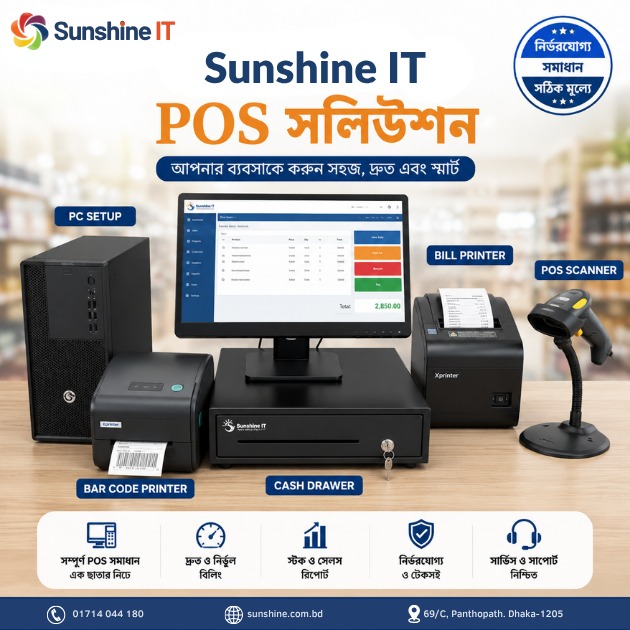
A complete POS counter may require:
- Computer or POS terminal
- Barcode scanner
- Thermal receipt printer
- Cash drawer
- Customer display
- Barcode printer
- UPS or backup power
Depending on the equipment and configuration, hardware can add a significant amount to your initial investment.
Some market listings show complete POS software-and-hardware packages around ৳55,000–৳65,000, although prices vary depending on hardware specifications and availability.
Therefore, when comparing two POS quotations, always ask whether the quoted price includes hardware.
Hidden Costs You Should Check Before Buying POS Software
The advertised price is not always the final cost.
Before purchasing, ask the vendor about the following:
Installation Cost
Is installation included?
Training Cost
Is employee training included in the package?
Hosting Cost
If the software is cloud-based, is hosting included?
Backup Cost
Does the vendor provide automatic data backup?
SMS Cost
If SMS notifications are available, are SMS charges included?
Maintenance Cost
Is there an annual maintenance or support fee?
Customization Cost
Will you have to pay separately for new features or reports?
Additional User Cost
Does adding more users require an additional payment?
Additional Branch Cost
Is multi-branch functionality included?
Understanding these costs can help you avoid unexpected expenses later.
One-Time POS Software vs Subscription POS
POS software in Bangladesh can generally be offered under different pricing models.
One-Time Payment
With a one-time license, you pay an upfront amount for the software.
For example:
Software = ৳20,000
However, you should check whether future updates, support, maintenance, hosting, and backups are included.
Monthly or Annual Subscription
Some cloud POS providers charge monthly or annual fees.
This model can include:
- Cloud hosting
- Automatic updates
- Data backup
- Technical support
- Remote access
The best model depends on your business size and long-term requirements.
Is Cheap POS Software Always Better?
Not necessarily.
A ৳5,000 or ৳10,000 system may look attractive initially, but if it lacks reliable backup, support, inventory management, reporting, or updates, it can create problems later.
For a business, the real cost of POS software should be measured by the value it provides.
A reliable POS system can help reduce:
- Billing errors
- Inventory mistakes
- Stock discrepancies
- Manual reporting
- Time spent on bookkeeping
- Customer service delays
Therefore, instead of asking only “What is the cheapest POS software in Bangladesh?”, ask:
“Which POS system gives my business the features and support I actually need at a reasonable total cost?”
How to Choose the Best POS Software in Bangladesh
Before making your final decision, use this checklist.
1. Identify Your Business Type
Are you running:
- Retail
- Super shop
- Pharmacy
- Restaurant
- Fashion store
- Wholesale business
- Multiple branches?
Your business type determines the features you need.
2. Count Your Users
Determine how many employees will use the POS system.
3. Estimate Your Product Volume
A business with 100 products has different requirements from a business with 20,000 products.
4. Decide Whether You Need Cloud Access
If you want to monitor your business remotely, cloud-based access may be important.
5. Check Backup Options
Ask how frequently your data is backed up and how it can be restored.
6. Ask About Support
A POS system is critical to daily business operations. Make sure technical support is available when you need it.
7. Request a Demo
A live demo can help you determine whether the software is easy for your employees to use.
Why POS Software Is Worth the Investment
A POS system is not simply an expense. For many businesses, it is an investment in better operational control.
With a good POS system, you can see:
- How much you sold today
- Which products are selling fastest
- What inventory remains
- Which customers have outstanding payments
- How much you purchased
- How your employees are performing
- Whether your business is making a profit
Sunshine’s POS solution, for example, provides sales, inventory, customer, supplier, purchase, employee, branch and financial reporting features.
This type of centralized information can make business decisions much easier.
Final Verdict: How Much Should You Budget for POS Software in Bangladesh?
For 2026, a reasonable starting budget for POS software in Bangladesh is around ৳15,000–৳30,000 for a basic to professional system, while advanced, customized, multi-branch, or hardware-inclusive solutions can cost more.
For example, Sunshine currently lists:
- Basic: ৳15,000
- Professional: ৳20,000
- Corporate: ৳30,000
The right choice depends on your business size, number of users, branches, inventory requirements, reporting needs, and whether you need customization.
If you are looking for a POS solution for a retail shop, pharmacy, restaurant, supermarket, wholesale business, or growing company, it is better to compare features + support + total cost rather than choosing a system based only on its advertised price.
You can explore Sunshine’s current POS features and packages on its Best POS Software in Bangladesh page.
Frequently Asked Questions About POS Software Price in Bangladesh
How much does POS software cost in Bangladesh?
Basic POS software can start at around ৳12,000–৳15,000, while professional and corporate solutions may cost ৳20,000–৳50,000 or more depending on features and customization.
What is the price of Sunshine POS software?
Sunshine currently lists its POS packages at ৳15,000 for Basic, ৳20,000 for Professional, and ৳30,000 for Corporate.
Does POS software include hardware?
Not always. Software and hardware are often priced separately. Always confirm whether the quotation includes a computer/POS terminal, barcode scanner, thermal printer, cash drawer, and other equipment.
Which POS software is best for a small business?
A small business should generally choose a system that covers billing, inventory, customer management, purchase management, reporting, backup, and technical support without paying for unnecessary enterprise features.
Is cloud-based POS better than desktop POS?
Cloud-based POS can be useful if you need remote access, centralized data, automatic updates, and online backup. However, the best choice depends on your business’s internet connectivity, workflow, budget, and operational requirements.
Can POS software be customized?
Yes. Many POS providers offer customization for reports, workflows, integrations, user permissions, and business-specific requirements. Sunshine also states that its POS software can be customized according to business needs.
Do I need POS software for a small shop?
If you want better control over sales, inventory, customer dues, purchases, and business reporting, POS software can be useful even for a small shop. The key is choosing a simple system that matches your actual requirements and budget.