
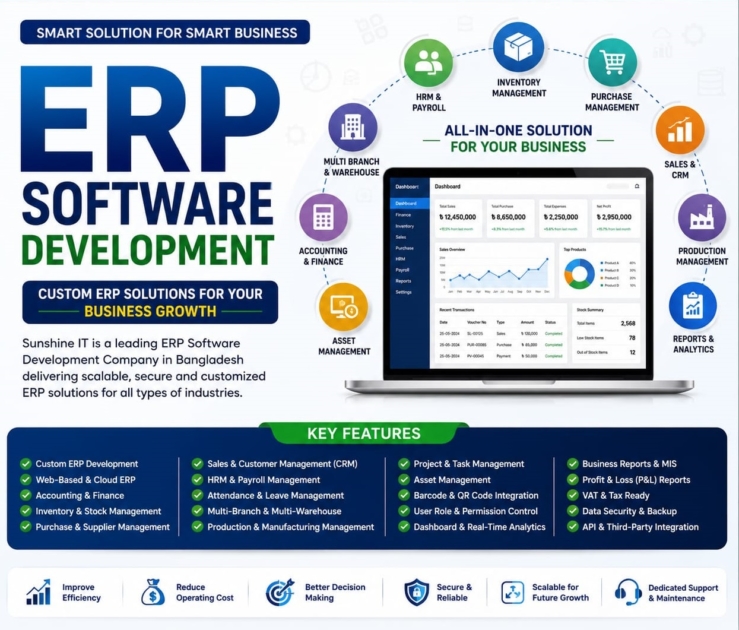
Running a business today involves managing multiple operations at once—from sales and inventory to accounting, purchasing, HR, and customer relationships. When these processes are handled using separate systems or spreadsheets, it often leads to data inconsistencies, manual errors, and unnecessary delays.
That’s why more businesses are investing in ERP (Enterprise Resource Planning) software. An ERP system connects all your core business functions in one centralised platform, making it easier to streamline workflows, improve collaboration, and access real-time business insights.
Whether you’re a small business looking to automate daily tasks or a growing enterprise aiming to scale efficiently, choosing the right ERP solution can make a significant difference.
In this article, we’ll explore the top 15 ERP software features every business should look for in 2026 to improve productivity, reduce operational costs, and support long-term growth.
What is ERP Software?
ERP (Enterprise Resource Planning) software is an integrated business management system that connects different departments, such as:
- Finance
- Accounting
- Sales
- Inventory
- Purchasing
- Human Resources
- Manufacturing
- Customer Management
Instead of using multiple disconnected software solutions, an ERP system stores everything in one centralised database, giving your team real-time access to business information.
Why ERP Software Features Matter
Choosing ERP software isn’t just about buying software.
It’s about selecting a system that can support your business for years to come.
The right ERP features help businesses:
- Increase productivity
- Reduce manual work
- Improve data accuracy
- Automate daily operations
- Save operational costs
- Make better business decisions.
- Scale with business growth
Now, let’s explore the most important ERP software features.
1. Centralised Business Dashboard
A powerful ERP should provide a single dashboard where business owners and managers can monitor:
- Sales
- Revenue
- Inventory
- Expenses
- Purchase orders
- Cash flow
- Outstanding payments
Real-time dashboards eliminate the need to check multiple reports separately.
2. Inventory Management
Inventory management is one of the most valuable ERP features.
It helps businesses:
- Track stock levels
- Monitor warehouse inventory
- Prevent stock shortages
- Reduce overstocking
- Manage multiple warehouses
- Receive low-stock alerts
Accurate inventory improves customer satisfaction while reducing unnecessary costs.
3. Accounting & Financial Management
An ERP should simplify financial operations by automating:
- General Ledger
- Accounts Payable
- Accounts Receivable
- Bank Reconciliation
- Tax Management
- Financial Statements
- Cash Flow Reports
This minimises accounting errors and saves valuable time.
4. Sales & Order Management
Managing customer orders manually often leads to mistakes.
ERP software automates:
- Quotations
- Sales Orders
- Invoicing
- Delivery Tracking
- Payment Status
- Order History
This creates a smoother experience for both customers and sales teams.
5. Purchase Management
A strong purchasing module helps businesses:
- Create purchase requests
- Manage suppliers
- Generate purchase orders
- Track incoming goods
- Compare supplier prices
- Monitor purchasing history
Better purchasing decisions help reduce costs.
6. Human Resource (HR) Management
Modern ERP software includes HR tools that simplify employee management.
Common HR features include:
- Employee Database
- Attendance Tracking
- Leave Management
- Payroll Processing
- Performance Evaluation
- Recruitment Management
Everything stays organised in one place.
7. Customer Relationship Management (CRM)
Built-in CRM allows businesses to manage customer relationships more effectively.
Features include:
- Customer Profiles
- Sales Pipeline
- Lead Management
- Follow-up Reminders
- Customer Purchase History
- Communication Records
Better customer management often leads to higher sales.
8. Real-Time Reporting & Analytics
Business decisions should be based on accurate data.
ERP software generates reports for:
- Sales Performance
- Profit & Loss
- Inventory Value
- Purchase Analysis
- Employee Performance
- Customer Reports
- Financial Summary
Real-time insights help managers respond quickly to changing business conditions.
9. Business Process Automation
Automation is one of the biggest advantages of ERP software.
It automates repetitive tasks like:
- Invoice Generation
- Approval Workflows
- Email Notifications
- Purchase Requests
- Stock Updates
- Payroll Calculations
Automation reduces human error and increases efficiency.
10. Multi-Branch Management
Businesses with multiple branches need centralised control.
ERP software allows you to manage:
- Multiple Locations
- Separate Warehouses
- Branch Sales
- Inventory Transfers
- Consolidated Reports
Everything can be monitored from a single dashboard.
11. Mobile Accessibility
Business owners don’t always work from the office.
Modern ERP systems offer mobile access so users can:
- Check reports
- Approve purchases
- Monitor sales
- Track inventory
- Review financial data
This keeps your business connected anytime, anywhere.
12. Role-Based User Permissions
Not every employee should access all business data.
ERP software lets administrators assign permissions based on user roles.
For example:
- Sales Team
- Accountant
- HR Manager
- Warehouse Staff
- Branch Manager
- Business Owner
This improves both security and accountability.
13. Data Security & Backup
Business data is extremely valuable.
A reliable ERP system should include:
- Data Encryption
- Automatic Backup
- User Authentication
- Activity Logs
- Cloud Security
- Disaster Recovery
Strong security protects your business from data loss and unauthorised access.
14. Third-Party Integration
ERP software should integrate with other business tools such as:
- Accounting Software
- POS Systems
- E-commerce Platforms
- Payment Gateways
- SMS Services
- Email Marketing Tools
- Banking Systems
Seamless integrations improve workflow efficiency.
15. Scalability for Future Growth
Your ERP should grow alongside your business.
A scalable ERP allows you to:
- Add new users
- Open new branches
- Increase inventory
- Manage larger customer databases.
- Add advanced modules
Choosing scalable software avoids costly migrations in the future.
Benefits of Choosing an ERP with the Right Features
When your ERP includes the right features, your business can enjoy:
- Faster business operations
- Improved productivity
- Better inventory control
- Accurate financial management
- Higher customer satisfaction
- Lower operational costs
- Improved employee performance
- Better business insights
- Increased profitability
How to Choose the Best ERP Software
Before selecting an ERP system, consider the following:
- Your business size
- Industry requirements
- Available modules
- Ease of use
- Customization options
- Customer support
- Cloud or on-premise deployment
- Integration capabilities
- Data security
- Future scalability
Investing in the right ERP today will save significant time and money in the future.
Final Thoughts
ERP software has become an essential investment for businesses looking to improve efficiency, automate operations, and support long-term growth.
Rather than focusing only on price, evaluate the features that align with your business goals. A feature-rich ERP system can streamline operations, improve collaboration across departments, and provide the insights needed to make confident decisions.
If you’re planning to implement an ERP solution in 2026, prioritise the features outlined in this guide to ensure your investment delivers lasting value.
Frequently Asked Questions (FAQs)
What are the most important ERP software features?
The most important ERP software features include inventory management, accounting, HR, CRM, sales management, reporting, automation, data security, multi-branch management, and cloud accessibility.
Is ERP software suitable for small businesses?
Yes. Modern ERP solutions are designed for businesses of all sizes and can help small businesses automate processes, reduce costs, and improve productivity.
Can ERP software integrate with POS and eCommerce platforms?
Yes. Most modern ERP systems integrate with POS software, eCommerce websites, payment gateways, accounting software, and other business applications.
What industries use ERP software?
ERP software is widely used in manufacturing, retail, wholesale, healthcare, construction, distribution, education, logistics, and service-based businesses.
Is cloud ERP better than traditional ERP?
Cloud ERP offers advantages such as remote access, automatic updates, lower infrastructure costs, and improved scalability, making it an excellent choice for many modern businesses.